The short answer: send a controlled handoff package
Send the clothing manufacturer a clearly named project folder containing the product brief, current tech pack, measurement specification, artwork files, material and trim requirements, color references, label and packaging files, quantity matrix, market and delivery inputs, and a revision or approval record. The exact package changes by stage: an initial quote can use documented assumptions, while sampling and bulk production need progressively tighter approvals.
A long email thread is not a production package. Neither is a presentation mockup with no dimensions. Start with a controlled manufacturer introduction and first-contact package, then share the approved working files for the relevant stage. For material decisions, add the fabric code, sourcing route and physical approval records described in the clothing manufacturer fabric sourcing guide. The objective is not to create the largest possible document; it is to let a pattern maker, merchandiser, material team, sample room and quality team identify the same product decisions.
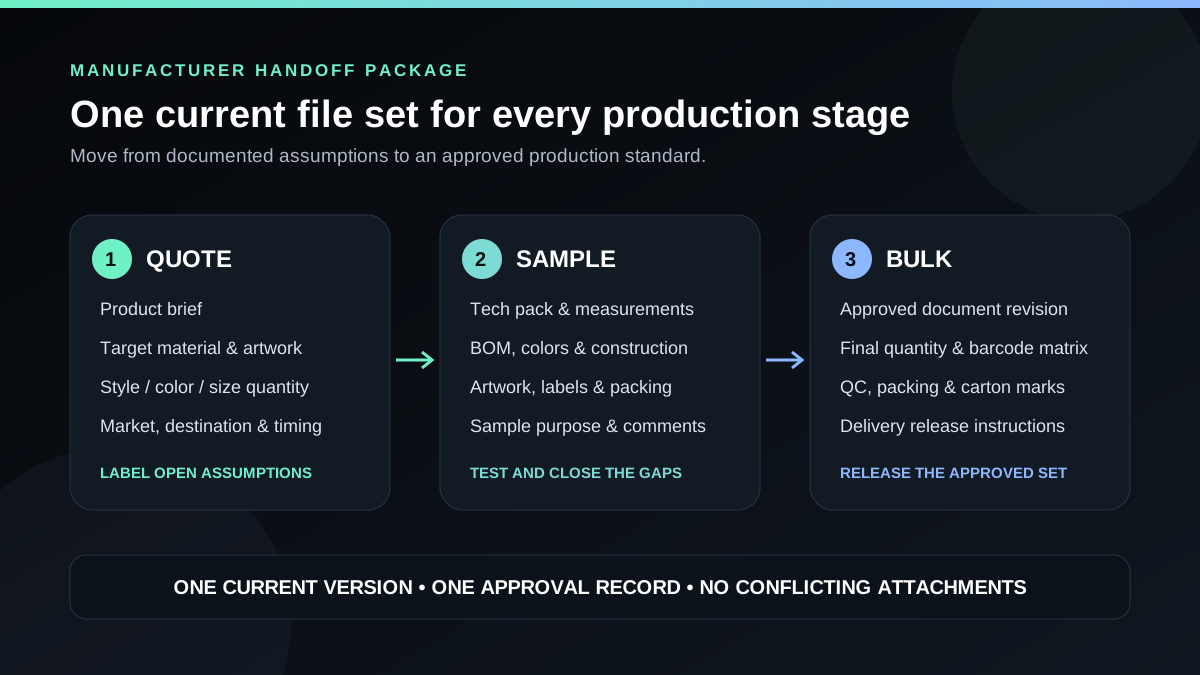
Send different files for quote, sample and bulk stages
| Stage | Minimum useful package | What must be clear |
|---|---|---|
| Feasibility and quote | Product brief, annotated references or draft tech pack, target material, artwork scope, quantity matrix, destination and timing | Which facts are confirmed, which are targets and which remain open |
| Development sample | Current tech pack, flats, measurements, BOM, artwork, colors, labels, construction details and sample objective | What the sample is intended to test and who will approve it |
| Pre-production approval | Revised tech pack, measurement comments, material and color approvals, final artwork, labels, packing and inspection criteria | Which physical sample and document revision form the approved standard |
| Bulk release | Approved specification set, final size-color quantities, packing matrix, carton marks, test or inspection scope and delivery instructions | No unresolved conflict between purchase order, tech pack, artwork, sample and packing files |
A factory may request its own templates or file formats after review. That is normal. The buyer still needs to control the content, revision and approval status of the information supplied.
1. Product brief or project cover sheet
The cover sheet lets the recipient understand the project before opening detailed files. It should identify the brand, style name or number, garment type, production route, intended market, target quantity, required delivery destination, contact owner and issue date. Include links to the controlled folder and state which revision is current.
- Style name and unique style code
- Garment category and intended use
- Finished blank, modified base or cut-and-sew route
- Target customer, market and size range
- Quantity by style and color
- Sample or quotation objective
- Destination and target delivery window
- Required, preferred and open decisions
If the product is not fully specified, say so. A manufacturer can sometimes propose a material or construction route, but the resulting quote must identify those assumptions rather than presenting them as approved facts.
2. Current tech pack
The tech pack is the working product specification. It normally brings together technical flats, construction callouts, materials, measurements, artwork, labels, packaging and revision information. Use the separate apparel tech pack guide for a detailed section-by-section build.
For the manufacturer handoff, the important control is that the filename, cover-page revision and issue date agree. Remove obsolete pages or mark them archived. If a later email changes a cuff, artwork size or fabric, incorporate that decision into the next controlled revision instead of asking the sample room to reconcile chat history.
3. Measurement specification and grading
Send finished-garment measurements with named points of measure and a diagram showing exactly how each point is taken. Identify the base sample size, values for required sizes, tolerance by critical point and whether measurements apply before or after washing.
A generic size chart copied from another product does not automatically define the intended fit. For a supplier blank, identify the exact blank style and record the accepted physical measurements. For custom cut-and-sew, connect the measurement chart to the pattern and sample revision. If grading is not yet approved, label it as a development input rather than a bulk standard.
4. Artwork source files and a placement sheet
Send artwork separately from the visual mockup. The editable source may be AI, EPS, PDF, SVG or another format required by the selected print, embroidery, patch or transfer workflow. Also include a review PDF or image that shows what the artwork should look like on the garment.
- Artwork name and revision
- Finished width and height
- Placement from measurable garment points
- Color references, spot colors or thread references where applicable
- Decoration method and any required texture or hand feel
- Font files or outlined text, as agreed
- Transparent background and separated layers where the process requires them
- Raster resolution suitable for the actual output size and method
Ask the production team which file type the chosen process requires; do not assume that one format is universal. A high-resolution PNG can be useful for review or certain digital workflows, but it is not a replacement for editable vector artwork when separations, scaling or embroidery digitizing require source information. Review the print, embroidery and combined-branding guide before finalizing the artwork package.
5. Bill of materials, fabric and color references
The bill of materials (BOM) should identify every component needed to make and pack one garment: shell fabric, rib, lining, thread, zipper, drawcord, buttons, patches, labels, polybag and other trims. For each line, state its location, material or composition, color, size or specification, approved supplier reference if buyer-nominated, and substitution rule.
Material descriptions should go beyond a mood word such as “premium” or “heavy.” Record relevant composition, knit or weave structure, target finished weight, stretch or performance need, surface, wash and color standard. Photos and swatches can communicate direction, but they should be labelled as target, approved standard or inspiration. If a physical swatch controls the decision, record its code and courier or approval date in the file set.
6. Labels, packaging and market information
Send editable and review files for brand labels, size labels, care or content labels, hangtags, barcodes, stickers and carton marks that fall within the order scope. Show dimensions, folds, material, colors, placement and attachment method. Supply final barcode or variable-data tables in a controlled spreadsheet rather than placing different values in scattered messages.
The destination market affects required product information and testing. Identify the markets where the goods will be sold and the party responsible for final compliance review. Do not assume that a supplier’s standard care label automatically satisfies the buyer’s fiber, care, origin, identity or language obligations. Use the custom clothing labels and packaging checklist to turn those decisions into a controlled component register.
7. Quantity matrix and commercial inputs
A total such as “500 hoodies” is not enough to plan materials or production. Send a matrix showing units by style, color and size, with totals that reconcile to the purchase order or RFQ. Separate sample quantities from bulk quantities and identify any allowed overrun, underrun or assortment rule.
For quotation, also state the delivery destination, requested shipping basis, packaging scope, target schedule and any testing or inspection requirement. The custom clothing quote guide explains how these inputs change price comparability, while the free custom clothing RFQ template provides a fillable cover document.
8. Annotated reference images
Reference images are useful when they explain one decision clearly: the shape of a pocket, the drape of a fabric, a wash range or the visual density of embroidery. Annotate what the manufacturer should study and what should not be copied. “Like this” is ambiguous when one photo contains fit, fabric, color, construction and styling decisions.
Keep inspiration separate from approved specifications and confirm that your team has the right to use submitted artwork and branded content. Reference images do not authorize copying another brand’s protected design, graphics or labels.
9. Sample comments, approvals and revision log
After the first sample, the handoff package becomes a controlled development record. Use a comment sheet with the sample type, receipt date, photos, measurement results, requested change, responsible party and status. Close each point as accepted, revised or still open.
When a pre-production sample is approved, archive the signed or dated approval, current tech pack, measurements, material and color approvals, artwork, label files and packing standard together. Use the pre-production sample checklist to review the physical garment and written record before bulk release.
How to organize the manufacturer folder
Use simple numbered folders so another person can understand the package without relying on your email. A washed hoodie sample handoff might look like this:
| Folder or file | Example contents |
|---|---|
| 00_Project_Cover | Brand_StyleCode_Cover_RevA_2026-08-04.pdf |
| 01_Tech_Pack | StyleCode_TechPack_RevA_2026-08-04.pdf |
| 02_Measurements | StyleCode_POM_BaseSize_RevA.xlsx and measurement diagram |
| 03_Artwork | FrontLogo_RevA.ai, BackGraphic_RevA.ai and review PDF |
| 04_Materials | BOM, fabric target, color references and approved swatch record |
| 05_Labels_Packing | Labels, hangtags, barcodes, folding and carton marks |
| 06_Quantity_Delivery | Style-color-size matrix, destination and required milestones |
| 07_Comments_Approvals | Sample comment log, approval status and dated evidence |
| 99_Archive | Superseded revisions retained for traceability, not production use |
A practical filename is Brand_Style_Component_Revision_Date.ext. Avoid names such as final-final-new-2. Share one view-only current folder for review, restrict editing where appropriate, test access before sending and keep the archived revisions out of the production-release folder.
What not to send as the only production input
- A screenshot-only mockup: it does not establish dimensions, materials, construction or print-ready artwork.
- Compressed images from messaging apps: they may lose scale, layers, color information and resolution.
- An unmarked mood board: it does not say which fit, fabric, color or detail is required.
- Conflicting attachments: different measurements or artwork revisions force the recipient to guess.
- One total order quantity: production needs the style, color and size allocation.
- Uncontrolled verbal changes: update the current document and issue the next revision.
- Passwords or financial credentials: a production folder should never contain sensitive payment access.
Ask the manufacturer to return a gap review
A professional handoff is a two-way control. Ask the manufacturer or sourcing team to confirm receipt and return a list of missing, conflicting or infeasible points before quoting or sampling.
- Files received and current revision recognized
- Construction or material feasibility conflicts
- Proposed substitutions requiring approval
- MOQ by style, fabric, color, size or process layer
- Sample type, cost, timing and purpose
- Quote inclusions, exclusions and assumptions
- Testing, inspection and packing responsibilities
- Next approval owner and deadline
This exchange is more valuable than a fast unit price built on hidden assumptions. It also reveals whether the project has enough information to proceed to the appropriate clothing sample stage.
Final checklist before you press send
- Open the shared link in a private browser window and confirm access.
- Check that the cover page, tech pack and filenames show the same revision and date.
- Confirm dimensions, placements and measurement units are stated.
- Reconcile the quantity matrix to the RFQ or purchase order total.
- Separate source artwork from review mockups.
- Mark references as target, inspiration or approved standard.
- Identify every required, preferred and open decision.
- Move superseded files to an archive outside the current release folder.
- Name the person authorized to approve samples and changes.
- Ask the recipient to return a written gap and assumption review.
When the package is ready, send it through the Wincome Apparel project review form. Projects are coordinated through authorized manufacturing partners selected for the required garment, material, process and order structure; facility-specific capabilities and documents are confirmed for each project.